

No new cards (yet), but we have a couple of new features and bug fixes in this patch.
Flourishes
There’s a new type of cosmetic you can purchase in the shop called “Flourishes” – these are entry effects that you can assign to your deck and are played when your General enters the battle. Intimidate your opponent as your General steps out of the Undervault and onto the field! You’ll recognize many of these effects as effects you’ve seen in game from spells or other in-game actions. We will add some more exclusive Flourishes in the future, but for now you have a variety of existing effects to choose from.
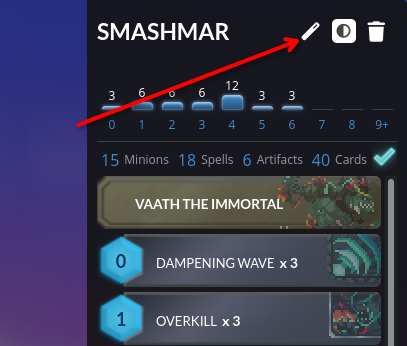
This button will take you to the flourish equip screen where you can preview the effects.
Board Coordinates
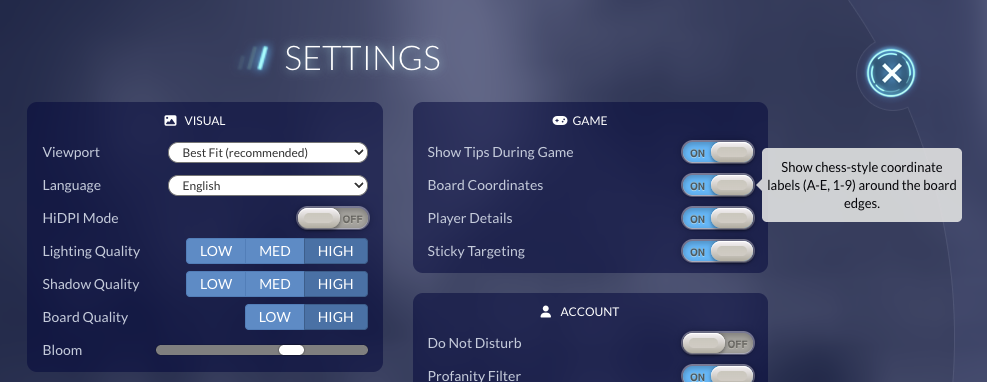
There’s a new setting to enable chess-like board coordinates on the board, making it easier to reference specific tiles on the board. The display is turned off by default for those who prefer the current clean look, but the setting can be turned on or off at any time in the Settings menu.
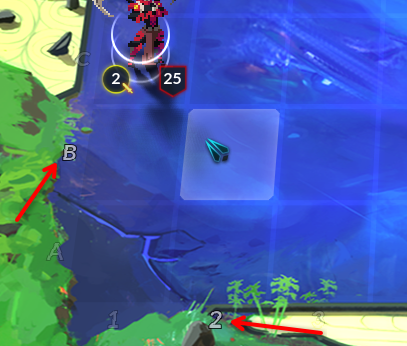
When hovering a board space, its respective coordinates will be highlighted.
Mini Window
When you’re on the matchmaking screen or in-game, you can now pop out a persistent mini-window by clicking the icon in the top-right of the screen. Now you can multi-task while your opponent ropes without missing out on your turn! (Note: this feature will only work in browsers that support picture-in-picture mode or the Steam build.)
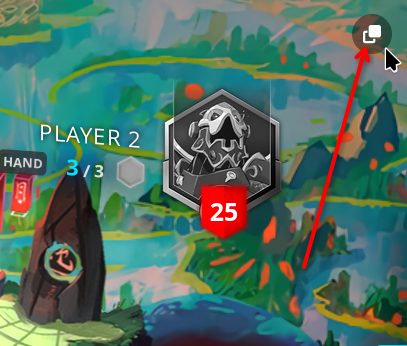
Clicking this button will utilize picture-in-picture mode (if available).
Bug Fixes
- Fixed Double Agent causing desyncs
- Fixed Firewhirl animation playing in the bottom left corner instead of where the spell was targeted in PvP games
- Fixed Eternity Sage / Eternity Core Dying Wish edge cases